An unfamiliar address in a Bitcoin transaction may be a change address: an address in your own wallet that receives the amount left over after a payment and its network fee. This can explain why a block explorer shows more bitcoin being spent than you intended to pay someone. However, an unfamiliar output is not automatically yours. Compare the transaction with your payment instructions and the BitBoxApp record before treating it as change.
Why a Bitcoin payment can create change
Your Bitcoin balance is made up of individual amounts received in earlier transactions, called unspent transaction outputs, or UTXOs. When a payment uses one of these amounts, it spends that output in full as an input. The transaction then creates new outputs for the recipient and, when needed, change returning to your wallet.
For more illustrations of how inputs and outputs fit together, see our blog article What's a UTXO?
Think of paying €60 with a €50 note and a €20 note. You hand over €70 and receive €10 in change; you have not paid the seller €70. The illustration below shows this cash analogy. It leaves out the network fee that applies to a Bitcoin payment.
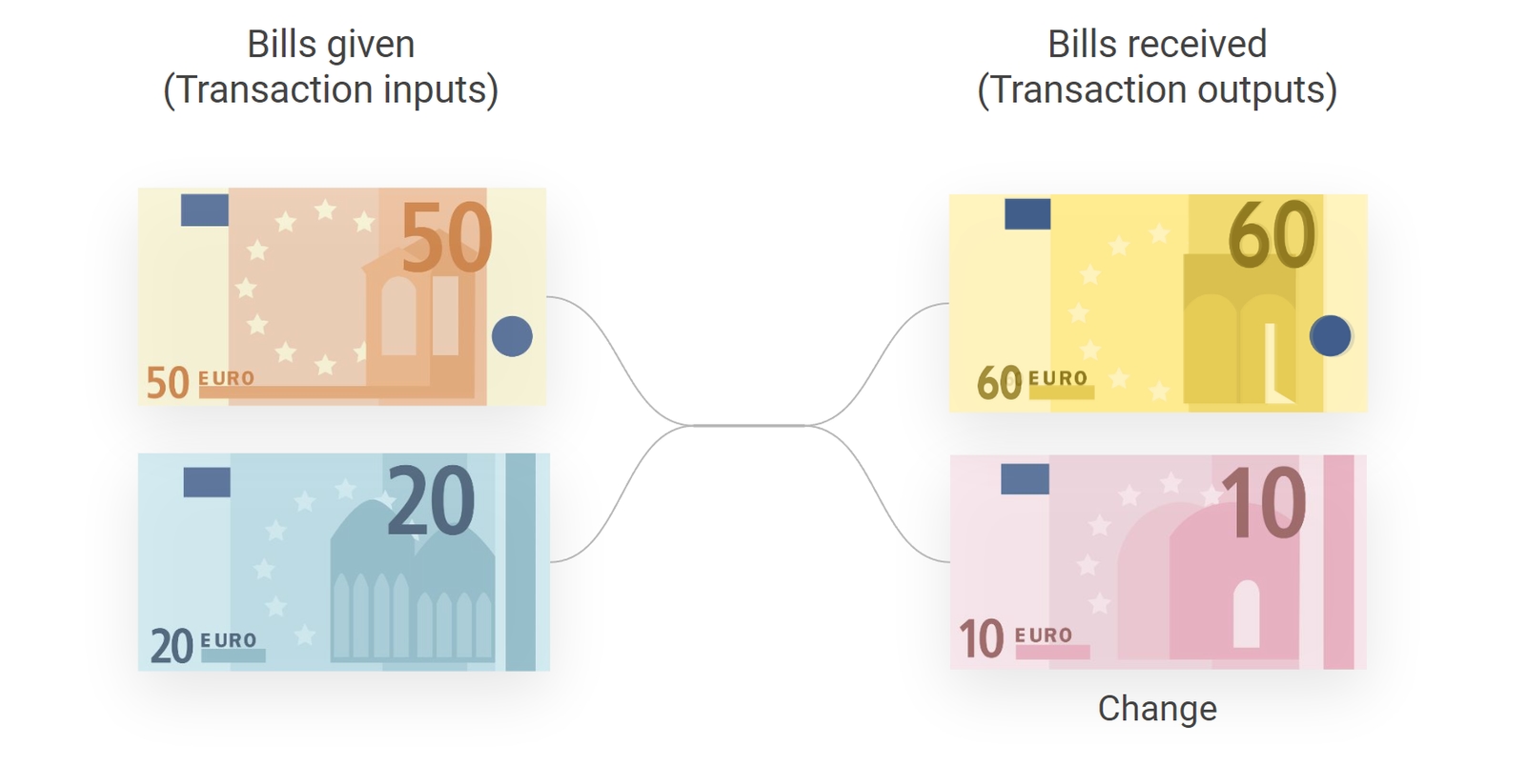
For a Bitcoin example, suppose your wallet spends one input worth 0.01000000 BTC to pay someone 0.00300000 BTC, with a network fee of 0.00001000 BTC. The result is:
- Recipient: 0.00300000 BTC goes to the agreed receiving address.
- Change: 0.00699000 BTC returns to an address in your wallet.
- Network fee: 0.00001000 BTC is the difference between the input and both outputs. It is not a third receiving output.
In this example, your wallet balance decreases by the payment plus the fee: 0.00301000 BTC. The remaining 0.00699000 BTC still belongs to you, even though the original input has been spent.
To understand why a Bitcoin payment includes a network fee, read our blog explanation of why Bitcoin transactions have fees.
Why the change address can look unfamiliar
For a normal payment, the BitBoxApp automatically selects an unused change address in the sending account. You may not recognize it because it is separate from the receiving address you previously shared. You do not need to copy a change address or make another payment to get the change back. During transaction signing, the BitBox checks wallet-owned change against the account's keys.
Do not identify change by its position in an explorer. The BitBoxApp shuffles transaction outputs, so change is not always the second or last output. Transactions can also have several inputs or no change output. A remainder too small to create a usable change output can be included in the fee instead.
Compare the transaction with your payment
For a payment you sent from the BitBoxApp, start with the intended Bitcoin account and the original receiving address and amount agreed with the recipient. Compare Bitcoin amounts in the same unit; a changing fiat estimate is not a change to the amount of bitcoin sent.
- Open the Bitcoin account in the BitBoxApp and find the payment in its transaction history. Select the magnifying-glass icon on the right side of the transaction row to open its details.
- Compare the recipient address and payment amount with your original payment instructions, and check the network fee separately. The total value of the explorer's inputs is not the amount paid to that recipient. See how to view transaction details in the BitBoxApp for the available fields.
- If you need to inspect the outputs, select Open in external block explorer at the bottom of the details window. Match the complete transaction ID with the BitBoxApp record, then find the output to the full agreed receiving address and compare its amount. Follow the Mempool guide for help reading the inputs, outputs and fee.
Opening a public explorer shares the transaction lookup with that service and can reveal related financial activity. You do not need to connect a wallet or sign anything for this lookup. Never enter recovery words, a private key, a password, a passphrase or a wallet backup into an explorer.
A matching recipient output confirms the amount assigned to that address in the transaction. It does not prove that every other output belongs to you. The change explanation applies when the remainder is returned to an address controlled by your wallet; an explorer's layout alone cannot establish that ownership.
If an address or amount is still unexpected
If you do not recognize the payment, the recipient address differs from the one you intended, or the amounts remain unexplained, do not assume the unfamiliar output is harmless change. Do not approve another transaction, send a second payment or reset your BitBox to try to resolve the discrepancy.
Contact BitBox Support with your BitBoxApp version, the transaction ID, what you intended to send and what differs. Share only the information needed for the investigation; a transaction ID can reveal financial activity. Never send recovery words, backup files, private keys, passwords or passphrases. Support can help interpret the transaction, but cannot reverse a confirmed Bitcoin payment.