Coin control is an advanced feature in the BitBoxApp that lets you choose exactly which bitcoin coins (UTXOs) are used in a transaction.
Most of the time, the BitBoxApp selects coins automatically, which works well for everyday payments. However, if you want more control over privacy, wallet organization, or which funds are spent, coin control can be useful.
A Bitcoin wallet does not hold a single balance. Instead, it consists of multiple individual UTXOs. Coin control allows you to decide which of these are used when sending bitcoin.
Info:
If you are new to Bitcoin, you can still use coin control safely, but it helps to understand the basics of UTXOs first. For a deeper explanation, see:
What is a UTXO?
Understanding change outputs
When you send bitcoin, your wallet may need to combine one or more UTXOs to reach the desired amount.
If the selected UTXOs are worth more than what you send, the remaining value is returned to your wallet as a change output (a new UTXO).

You can think of this like paying with cash:
If something costs $12 and you use a $20 bill, you receive $8 back as change.
Important things to know about change
-
Change is not lost funds
It is returned to your wallet as a new UTXO. -
Change uses a new address automatically
Your wallet generates a fresh address for each transaction to improve privacy. -
Change addresses are not manually selectable
They are created automatically during the transaction. -
Change affects future coin control
The new UTXO becomes part of your wallet and may be used in future transactions.
Why this matters
Since change creates new UTXOs, the way you select coins today directly affects:
- how your wallet is structured
- how easily transactions can be linked
- how you can use coin control in the future
When should you use coin control?
Coin control is especially useful when you want to:
- avoid linking funds from different sources
- spend a specific UTXO
- consolidate many small UTXOs
- keep funds organized by purpose or origin
- make better use of labels and transaction history
Why coin control matters
Improve privacy
When you spend multiple UTXOs in one transaction, they become linked on the public blockchain. This can reveal connections between funds that came from different sources.
Coin control helps reduce unnecessary linking by letting you choose which UTXOs to spend together.
For example, you may want to keep separate:
- coins received from an exchange
- coins received privately
- coins related to different use cases
- coins linked to different people or services
Warning:
Once UTXOs are spent together in one transaction, that link is visible on the blockchain and cannot be undone.
Prove ownership of funds
In some situations, you may need to prove that you control a specific address or UTXO.
For example, a service may ask you to send a small transaction from a certain address as part of a verification process. Coin control allows you to select the correct UTXO instead of relying on automatic coin selection.
See also:
How to perform a Satoshi test to verify a Bitcoin address (BitBoxApp + BitBox02)
Consolidate small UTXOs
Over time, your wallet may collect many small UTXOs. This can happen if you receive bitcoin frequently or create many change outputs.
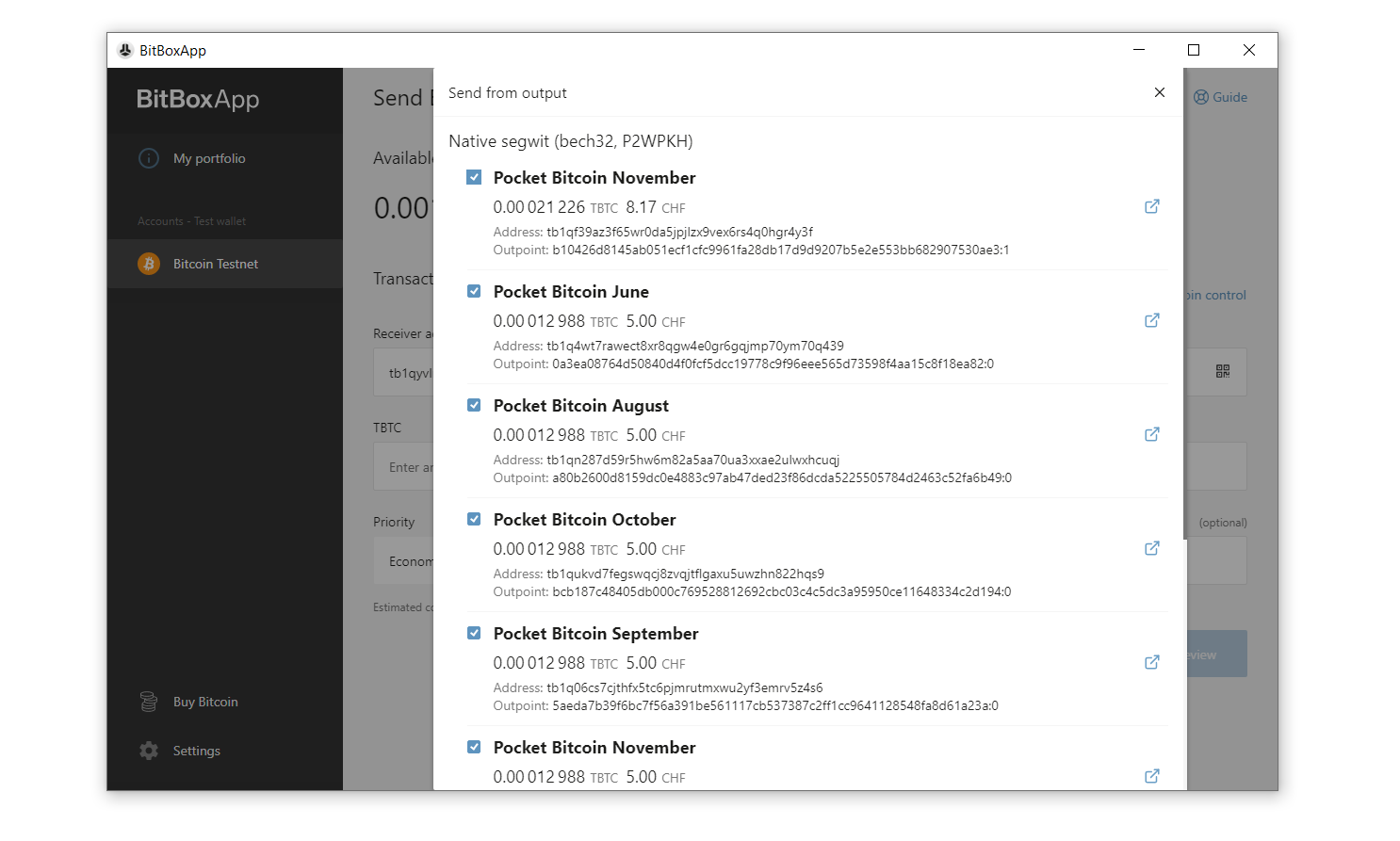
Coin control allows you to combine these smaller UTXOs into fewer, larger ones (UTXO consolidation).
This can:
- make your wallet easier to manage
- reduce future transaction fees
To learn more:
What is ‘UTXO consolidation’ and how can it help me reduce transaction fees?
Success:
Consolidating UTXOs is often most effective when Bitcoin network fees are low.
Keep funds organized
Coin control helps you maintain a clear structure in your wallet.
You can separate funds by:
- purpose (savings, spending, business)
- source (exchange, private transfer, salary)
- context (different services or counterparties)
This makes it easier to manage your funds over time, especially when combined with labels.
Best practices when using coin control
Label your transactions
Labels help you understand where funds came from and how they are used.
Examples:
- From Kraken
- Salary payment 09/2025
- Payment from client
- Private purchase
You can add notes in the BitBoxApp transaction details.
For more information:
Managing wallet labels (BIP-329)
Info:
Good labels make it easier to decide which UTXOs belong together and which should remain separate.
Avoid unnecessary address reuse
For better privacy, use a new receiving address for each payment.
If an address has been reused, the BitBoxApp may show an “Address re-used” tag in the coin control panel.

Address reuse makes it easier to link multiple transactions to the same wallet history. In some cases (e.g. exchange whitelisting), reuse may be required, but it is generally best to avoid it.
Warning:
Reusing addresses weakens privacy and makes blockchain analysis easier.
Frequently Asked Questions
What happens if I accidentally mix UTXOs from different sources?
Once the transaction is confirmed, those UTXOs become linked on the blockchain. This reduces privacy and cannot be undone.
Does coin control improve privacy automatically?
No. Coin control is a tool that gives you more control, but privacy depends on how you use it. Selecting the wrong combination of UTXOs can reduce privacy instead of improving it.
When is coin control especially useful?
Coin control is useful when you want to:
- avoid linking funds
- spend a specific UTXO
- consolidate small UTXOs
- keep your wallet organized
Do I need coin control for every transaction?
No. Automatic coin selection works well for most everyday transactions. Coin control is mainly useful when privacy, organization, or precise UTXO selection matters.
I enabled coin control, but I still can’t see it. Where is it?
Coin control only appears while preparing a Bitcoin transaction.
Open a Bitcoin account, click Send, and then open the coin control option from the send screen.