Delivery to a PO box, packing station, or pickup location is only possible in specific countries and only when the address is entered correctly.
At the moment, we can support these options only for:
- Germany, through DHL
- Switzerland, through Swiss Post
For Austria and all other countries, delivery to PO boxes, packing stations, or postal access points is not supported or cannot be guaranteed.
This option is often used by customers who prefer not to use their private home address for delivery. Please make sure to follow the correct address format before placing your order.
For more background, you can also read our blog article: Order the BitBox02 hardware wallet without disclosing your private address.
Germany: DHL PO boxes and packing stations
For orders shipped to Germany, delivery can be made to DHL-managed locations such as:
- DHL PO boxes
- DHL Packstations
- DHL post offices / parcel shops
This option only works with DHL and requires a valid DHL customer account.
Germany is currently the only country where delivery to a DHL PO box or DHL Packstation is supported. Austria is not supported for this delivery method.
How to receive your order at a DHL PO box or Packstation
Step 1: Register with DHL
Before placing your order, make sure you have an active DHL customer account.
- Register with DHL.
- Confirm your account if required.
- Find your DHL customer number, also called Postnummer.
Your Postnummer is required so DHL can assign the parcel to your account.
Step 2: Find the DHL location address
Use DHL’s location finder to choose the correct DHL PO box, Packstation, post office, or parcel shop.
- Open DHL’s location finder.
- Search for your preferred location.
- Copy the exact location number and address details.
Step 3: Enter the delivery address during checkout
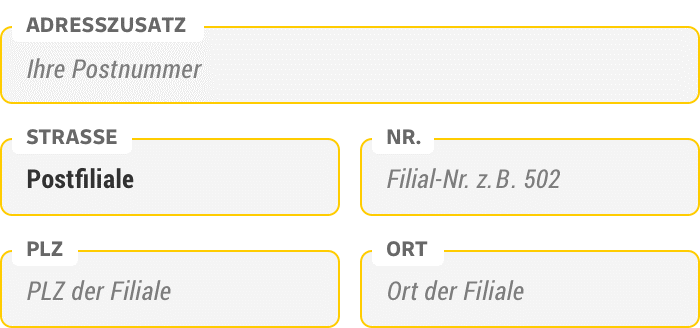
Enter the delivery address exactly as required for your selected DHL location.
Use the following structure:
| Field | What to enter |
|---|---|
| First name | Your first name |
| Last name | Your last name |
| Street name and house number | DHL location type and number (e.g., Packstation 123 or Postfiliale 123) |
| Other address details | Your DHL Postnummer |
| Postal code | Postal code of the selected DHL location |
| City | City of the selected DHL location |
| Country | Germany |
| Phone number (optional) | A valid phone number for DHL contact |
Your DHL Postnummer and the correct DHL location number are mandatory. If the address is incomplete or entered in the wrong fields, delivery may fail.
Step 4: Wait for the pickup notification
Once the parcel arrives at the selected DHL location:
- DHL will notify you by email or app.
- Follow DHL’s pickup instructions.
- Collect your parcel at the selected location.
For more detailed DHL instructions, see DHL’s official guide:
How to address parcels to a postal outlet
This DHL guide explains registration, the required Postnummer, and the correct address format for delivery to a DHL postal outlet or parcel shop.
Switzerland: Swiss Post pickup options
For orders shipped within Switzerland, supported pickup options are handled through Swiss Post, not DHL.
Depending on the Swiss Post service and the selected location, customers may be able to use:
Each method requires a specific address format. Please enter the details carefully during checkout.
Swiss Post pickup services usually require a Swiss Post customer account or specific addressing instructions. Please check the selected Swiss Post service before placing your order.
How to receive your order with PickPost
PickPost allows you to receive your parcel at selected Swiss Post access points.
Step 1: Register with Swiss Post
Before using PickPost, make sure you have a Swiss Post customer account.
- Create or open your Swiss Post account.
- Find your User ID in the Swiss Post customer portal.
- Choose a PickPost access point.
Your User ID is required so Swiss Post can assign the parcel to you.
Step 2: Find the PickPost address
Use Swiss Post’s location search to find the correct PickPost access point.
- Search for your preferred PickPost location.
- Open the Addressing tab for the selected location.
- Copy the address exactly as shown.
Step 3: Enter the PickPost address during checkout
Enter the delivery address in the checkout form as follows:
| Field | What to enter |
|---|---|
| First name | Enter your first name. |
| Last name | Enter your last name. |
| Street name and house number | Enter the PickPost address shown by Swiss Post. |
| Other address details | Enter:PickPost [your User ID]
|
| Postal code | Enter the postal code of the selected PickPost access point. |
| City | Enter the city of the selected PickPost access point. |
| Country | Select Switzerland. |
The keyword PickPost and your Swiss Post User ID must be included correctly. Without this information, Swiss Post may not be able to assign the parcel to you.

How to receive your order with My Post 24
My Post 24 allows you to receive your parcel at selected Swiss Post parcel terminals.
Step 1: Register with Swiss Post
Before using My Post 24, make sure you have a Swiss Post customer account.
- Create or open your Swiss Post account.
- Find your User ID in the Swiss Post customer portal.
- Choose a My Post 24 terminal.
Step 2: Find the My Post 24 address
Use Swiss Post’s location search to find the correct terminal.
- Search for your preferred My Post 24 terminal.
- Open the Addressing tab for the selected terminal.
- Copy the address exactly as shown.
Step 3: Enter the My Post 24 address during checkout
Enter the delivery address in the checkout form as follows:
| Field | What to enter |
|---|---|
| First name | Enter your first name. |
| Last name | Enter your last name. |
| Street name and house number | Enter the My Post 24 terminal address shown by Swiss Post. |
| Other address details | Enter:My Post 24 [your User ID]
|
| Postal code | Enter the postal code of the selected My Post 24 terminal. |
| City | Enter the city of the selected My Post 24 terminal. |
| Country | Select Switzerland. |
The keyword My Post 24 and your Swiss Post User ID must be included correctly. If the address is incomplete, delivery may fail.

How to receive your order with Poste restante
Poste restante allows you to receive a consignment at a Swiss Post branch without using a private home address.
Step 1: Choose a Swiss Post branch
Choose the Swiss Post branch where you want to collect the parcel.
Step 2: Enter the Poste restante address during checkout
Enter the delivery address in the checkout form as follows:
| Field | What to enter |
|---|---|
| First name | Enter your first name. |
| Last name | Enter your last name. |
| Street name and house number | Enter:Postlagerndor Poste restante
|
| Other address details | Enter the street and house number of the selected Swiss Post branch, if the checkout form provides this field. |
| Postal code | Enter the postal code of the selected Swiss Post branch. |
| City | Enter the city of the selected Swiss Post branch. |
| Country | Select Switzerland. |
The recipient name must clearly match the person collecting the parcel. Swiss Post may require identification when the parcel is picked up.

Austria and all other countries
Delivery to PO boxes, packing stations, or postal pickup locations is not supported for Austria or other countries.
For international shipments outside Germany and Switzerland:
- Parcels may be processed by local customs authorities.
- Acceptance of PO boxes depends on local postal rules.
- UPS and other carriers may not deliver to postal PO boxes.
- Delivery to PO boxes or packing stations cannot be guaranteed.
If delivery is not possible, the carrier may:
- Contact you for an alternative address.
- Redirect the shipment.
- Return the shipment to us.
If you want to avoid using your private home address outside Germany or Switzerland, we recommend checking whether an authorized reseller is available in your region.
You can find authorized resellers here:
→ Buy BitBox
FAQ
Can I use a PO box in Austria?
No. Delivery to PO boxes or packing stations in Austria is currently not supported.
Can I use a DHL Packstation in Switzerland?
No. Switzerland uses Swiss Post methods such as PickPost, My Post 24, or Poste restante. DHL Packstation delivery is only supported in Germany.
Can I use PickPost or My Post 24 in Switzerland?
Yes, if you enter the Swiss Post address details correctly and include the required keyword and your Swiss Post User ID.
For PickPost, use:
PickPost [your User ID]
For My Post 24, use:
My Post 24 [your User ID]
Can UPS deliver to PO boxes or packing stations?
UPS generally does not deliver to postal PO boxes or postal packing stations.
However, depending on your country, city, and available UPS services, UPS may offer delivery or redirection to:
- UPS Access Points
- UPS Stores
- Other UPS pickup locations with a valid street address
These are not postal PO boxes. They are physical locations within UPS’s own delivery network.
From our experience, these options usually require a UPS account with UPS My Choice enabled. Availability also depends on the shipment, the destination, local UPS options, and whether UPS allows delivery changes for the parcel.
UPS Access Point delivery or redirection cannot be guaranteed. Please check the available UPS options directly in your UPS tracking or UPS My Choice account.
What happens if delivery to a PO box or pickup location fails?
If the carrier cannot deliver to the provided address, they may request an alternative address or return the shipment to us.
To avoid delays, always check the address format before placing your order.
Can I change the delivery address after ordering?
In most cases, no. Once an order has been shipped, delivery address changes are usually limited or not possible.
Please make sure all delivery details are correct before placing your order, especially when using a PO box, Packstation, or pickup location.
If you notice an address error after your order has already been shipped, please contact our support team and include:
- Your order ID
- Your tracking number
- The correct delivery address
We will check what options are available for your shipment.
For DHL shipments in Germany, there may be one additional option: Digital Refusal to Accept Delivery. This does not change the delivery address. Instead, it rejects the parcel and returns it to us as the sender.
You can find DHL’s official information here:
Digital Refusal to Accept Delivery
Digital refusal is only relevant for DHL shipments and may only be available before the parcel has been loaded into the delivery vehicle. Please only use this option if you want the shipment to be returned to us so we can review a possible reshipment.